


Luminar Legacy Campaign Has Started: Desktop Plan for €59
Special pricing for eligible owners of previous Skylum products.
We’re excited to let you know that the Luminar Legacy Campaign starts today, September 21!
Owners of previous Skylum products — including Luminar AI, Luminar 4, Luminar 3, Luminar 2018, Aurora HDR, and other eligible legacy products — may be eligible to upgrade to Luminar at the special €59 Desktop Only price instead of €129.
Please note: The special €59 Legacy offer is available to eligible users once they log in to their Skylum account. New users will see the standard offer instead.
📅 Campaign timeline: September 21, 15:00 (EEST) – October 16, 2026
Get the Luminar Legacy Offer →Disclosure: We may earn a commission from purchases made through our affiliate link. This does not affect the price you pay.
Exploring Skylum Luminar Neo: An Honest Review & Comprehensive Guide
Introduction
If you’ve spent any time searching for photo editing software, you’ve likely come across Skylum’s Luminar Neo — and with good reason. We’ve spent time hands-on with the platform, testing its AI tools across portrait, landscape, and product photography scenarios, and this review reflects what we actually found: what works brilliantly, where it has limits, and whether it’s worth your money in 2026.
Skylum is a photo editing software company founded in 2008, now best known for its AI-powered tools that genuinely do some of the heavy lifting for you. Their flagship product, Luminar Neo, is built for photographers and content creators who want professional-quality results without a six-month learning curve.
Let’s get into it.
→ Get Luminar Neo | → Get Aperty | Read our full Aperty review

What Is Luminar Neo?
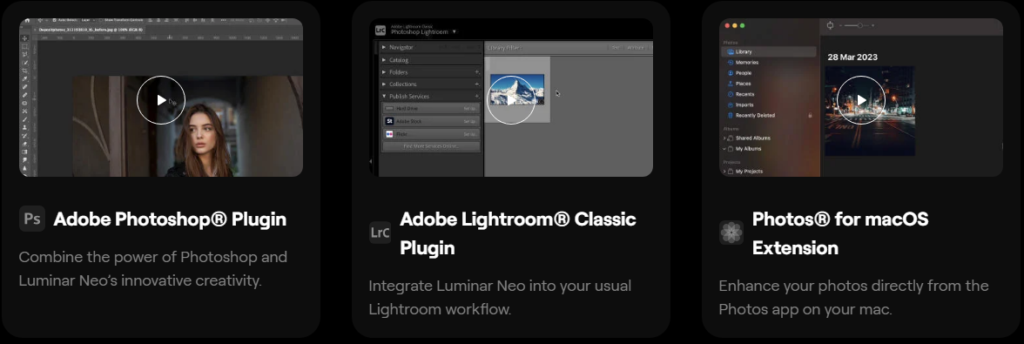
Luminar Neo is Skylum’s most advanced photo editor — a standalone desktop application that also works as a plugin inside Adobe Photoshop and Lightroom. It supports RAW files, layers, masking, and a growing library of AI-powered enhancements that handle tasks which would traditionally take hours of manual work.
In our testing, the AI tools were the standout feature. Sky Replacement AI, for example, produced natural-looking results in under a minute on images that would typically require careful masking in Photoshop.
Key Features of Luminar Neo
AI-Powered Editing
- Sky Replacement AI — Replace dull or blown-out skies instantly, with automatic lighting and shadow matching so the result looks natural.
- Relight AI — Selectively adjust foreground and background lighting independently. Particularly useful for fixing backlit portraits.
- Portrait Bokeh AI — Adds a convincing, DSLR-style background blur to portraits taken on phones or kit lenses.
- Structure AI — Sharpens textures in landscapes and architecture while intelligently preserving skin tones in the same frame.
Non-Destructive Editing
Every adjustment is fully reversible. You can experiment freely without ever touching the original file — a non-negotiable for any serious workflow.
Layers and Masking
Luminar Neo offers a proper layer-based system with masking tools, letting you blend effects, add textures, and composite images with genuine precision.
Extensions for Specific Needs
- HDR Merge — Combine bracketed exposures into high-dynamic-range images.
- Upscale AI — Intelligently increase image resolution without the usual artefacts or loss of detail.
Workflow Integration
Works seamlessly as a plugin inside Adobe Photoshop and Lightroom, so you don’t have to abandon your existing setup to benefit from Luminar’s AI tools.
One-Click Templates
Pre-built AI templates analyse your image and apply edits tailored to the content — useful for beginners, and a handy starting point even for experienced editors.
Top 5 Reasons Why Luminar Neo Stands Out as the Best
1. AI That Actually Saves Time
Unlike many tools that call themselves “AI-powered” as a marketing badge, Luminar Neo’s AI tools produce results that genuinely reduce editing time. Sky Replacement and Relight AI in particular handled complex tasks in our testing that would have taken significantly longer in a traditional editor.
2. Accessible for All Skill Levels
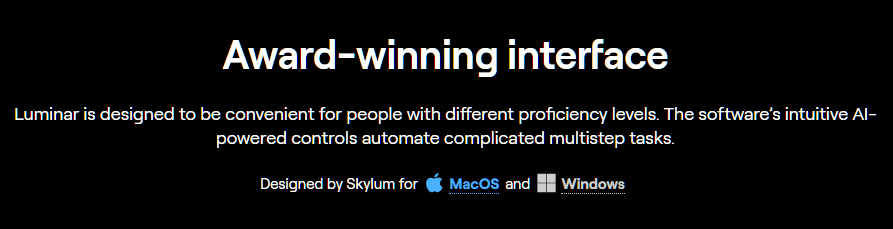
The interface is clean and logically organised. A beginner can get polished results from the first session, while advanced users have enough depth — layers, masking, manual controls — to work professionally.
3. Non-Destructive Workflow
The ability to experiment without consequence is something every photo editor should offer, but not all do well. Luminar Neo’s implementation is solid, and revisiting edits later is straightforward.
4. Genuine Photoshop and Lightroom Integration
This matters more than it sounds. Being able to call Luminar Neo as a plugin mid- workflow — rather than exporting, editing elsewhere, and reimporting — keeps your process clean and efficient.
5. One-Time Purchase Option
The lifetime licence model is increasingly rare in software. For photographers who resent monthly subscription fees, this alone is a compelling reason to consider Luminar Neo seriously.

Luminar Neo: Pros & Cons
| Pros | Cons |
|---|---|
| Genuinely impressive AI tools | Some AI features are extensions (paid add-ons) |
| Clean, beginner-friendly interface | Can be slow on older or lower-spec hardware |
| Non-destructive editing throughout | Fewer graphic design tools than Photoshop |
| Lifetime licence option available | Major version upgrades may cost extra |
| Works as a Photoshop/Lightroom plugin | Not ideal as a full Lightroom catalogue replacement |
| Supports RAW files | Smaller community/resource library than Adobe |
Is Luminar Neo as Good as Photoshop?
Short answer: it depends what you’re using Photoshop for.
For photo editing and enhancement, Luminar Neo holds its own — and in some specific tasks (sky replacement, portrait retouching, relighting), it’s genuinely faster and easier. If your primary work is photography, it’s a legitimate alternative.
For graphic design, compositing, or advanced retouching, Photoshop remains the industry standard. It has a broader toolset, a larger community, and deeper integration with the wider Adobe ecosystem.
The more relevant comparison for most users is Luminar Neo vs Lightroom — and there, Luminar Neo competes more directly on photo editing features, with a lower price point and no subscription required.
Pricing: How Much Does Luminar Neo Cost?
- Subscription plan: $69/year
- Lifetime licence (one-time purchase): $99
Prices may vary during promotional periods — Skylum regularly runs seasonal sales.
For most users, the lifetime licence represents better long-term value. Two years of the subscription matches the one-time cost, and the licence continues beyond that at no extra charge.
Note: Skylum occasionally releases major version upgrades (e.g. Luminar AI → Luminar Neo) that may require a discounted upgrade purchase rather than being free updates. Factor this into your long-term cost calculation.
→ Check Current Luminar Neo Pricing & Deals
Is Luminar Neo Free?
Luminar Neo is not free, but Skylum offers a free trial that lets you test the full software before purchasing. No credit card is required for the trial. We’d recommend using it to test the Sky AI and Relight AI tools specifically — those are where the software earns its price most clearly.

Our Honest Verdict
After testing Luminar Neo across multiple use cases, our overall take is this: it’s a genuinely useful, well-built photo editor that earns its price for photographers at any level.
The AI tools aren’t gimmicks — they work, they save time, and they produce results that look natural rather than over-processed. The interface is one of the most approachable we’ve used in this category. And the lifetime licence option makes the cost decision straightforward.
It won’t replace Photoshop for designers or power users who need the full Adobe toolkit. But for photographers, content creators, and bloggers who want polished images without spending months learning complex software — Luminar Neo is one of the most practical investments you can make. If you also shoot a lot of portraits, it’s worth pairing with Skylum’s portrait-focused editor, Aperty, which we cover in a separate review.
Review Scores
| Category | Score |
|---|---|
| Ease of Use | 4.7 / 5 |
| AI Features | 4.8 / 5 |
| Performance | 4.6 / 5 |
| Value for Money | 4.5 / 5 |
| Overall | 4.65 / 5 |
→ Get Luminar Neo | → Get Aperty
Frequently Asked Questions (FAQ)
Is Skylum Luminar Neo free? No — but Skylum offers a free trial with full feature access. No credit card needed. It’s the best way to test the AI tools before committing.
Is Luminar Neo a one-time purchase or a subscription? Both options are available. The subscription is $69/year; the lifetime licence is $99 as a one-time payment. Note that major future version upgrades may require a separate (usually discounted) upgrade fee.
Does Luminar Neo work with Photoshop and Lightroom? Yes. Luminar Neo functions as a plugin for both Adobe Photoshop and Lightroom, integrating into your existing workflow without disruption.
Is Luminar Neo better than Photoshop? For photo editing specifically, Luminar Neo competes strongly — particularly for AI-assisted tasks like sky replacement and portrait retouching. For graphic design or advanced compositing, Photoshop remains the more capable tool.
What is the difference between Luminar Neo and Luminar AI? Luminar Neo is the newer, more advanced product. It introduces a layer-based editing system, additional AI tools, and an extensions marketplace. Luminar AI is the predecessor — still functional, but no longer receiving major updates.
Does Luminar Neo work on both Mac and Windows? Yes. Luminar Neo is available for both macOS and Windows. Check Skylum’s website for the minimum system requirements, as some AI features are hardware-intensive.
Can I use Luminar Neo for professional photography? Absolutely. It supports RAW files, non-destructive editing, advanced masking, and integrates with professional workflows. Many working photographers use it alongside or instead of Lightroom.
Is there a mobile version of Luminar Neo? As of our testing, Luminar Neo is a desktop application only (Mac and Windows). No official mobile app is currently available.
Check our Creator Tools & Software Here
We may earn a small commission if you purchase through these links, at no extra cost to you.
Warm regards,









Please keep comments helpful and respectful.
No affiliate links, promotional links, or YouTube URLs.
Let’s keep our community clean and supportive! 💙